Recruiting is, above all, about communication. Every day, recruiters juggle dozens of conversations with candidates — clarifying details, scheduling interviews, answering questions, sending offers. The problem is that these conversations are scattered across WhatsApp, Telegram, email, phone calls, and job portal inboxes. HRStream solves this with a built-in omnichannel messenger — a single window for all candidate communications. In this article, we break down how it works and why it changes the way recruiting teams communicate.
The Problem: Communication Chaos for Recruiters
Picture a typical scenario. A recruiter is managing 15 open positions, each with 20–50 active candidates. That's 300–750 contacts to stay in touch with. Now consider where those conversations actually live:
- Some threads are in WhatsApp on the recruiter's personal phone.
- Some are in the corporate inbox.
- Some are in HeadHunter's internal chat.
- Some are in Telegram.
- Call notes are in a notepad — or nowhere at all.
The consequences:
- Lost context. A colleague asks to take over a candidate — so you forward a stack of WhatsApp screenshots. Or you don't, because there are 50 of them.
- No visibility. A hiring manager asks, "Where does Candidate Ivanov stand?" — the recruiter spends 10 minutes hunting for the last message.
- Risk when a recruiter leaves. When a recruiter resigns, the entire history of conversations with 200 candidates walks out the door with their phone.
- Duplication. Two recruiters reach out to the same candidate without knowing it. The candidate loses confidence in the company.
- Slow response times. A candidate messages on WhatsApp while the recruiter checks it once an hour between tasks in the ATS.
Our data shows that recruiters spend up to 40% of their working day switching between communication channels and searching for the right conversation thread. That's time that could go toward evaluating candidates and filling roles.
The Solution: HRStream's Omnichannel Messenger
HRStream's messenger is a built-in communication tool that brings every channel into a single interface. All inbound and outbound messages — WhatsApp, web chat, and other channels — are collected in one place and automatically linked to the candidate's profile and the relevant job opening.
Core Principles
- Single window. All conversations in one interface — no switching between apps.
- Linked to the candidate. Every message is automatically tied to the candidate's profile. Open a candidate card and see the full communication history at a glance.
- Team access. The whole team can see every conversation. Handing off a candidate to a colleague takes seconds — no screenshot forwarding required.
- Job context. Every chat is linked to a specific position. The recruiter can see which role the conversation is about, what pipeline stage the candidate is at, and what has already been discussed.
WhatsApp Integration: Like a CRM, Built for Recruiting
WhatsApp is the most widely used messaging app for professional communication in Kazakhstan and Russia. 87% of candidates prefer receiving job information via WhatsApp rather than email or phone calls. HRStream provides a full integration with the WhatsApp Business API.
Connecting WhatsApp
HRStream connects to WhatsApp via the official Business API — a corporate channel, not the recruiter's personal phone. Here's what that means in practice:
- Company number. Candidates message the company's number, not a recruiter's personal one. When a recruiter leaves, all conversations stay in the system.
- Multiple operators. Multiple recruiters can work from a single WhatsApp number simultaneously. Each can see their own chats and jump into a colleague's conversation when needed.
- Reliability. The Business API isn't blocked for bulk messaging (unlike WhatsApp Web), supports message templates, and runs 24/7.
- Security. Messages travel over a secure channel; data is stored on your servers, not on a personal device.
What Working in the Messenger Looks Like
The HRStream messenger interface has three panels:
- Conversation list (left). All active chats with candidates, sorted by the most recent message. Unread message counters, candidate name, message preview, linked job. Filter by position, status, or search by name.
- Chat (center). The full conversation history with a candidate. Supports text, photos, documents, and voice messages. A message input field with quick-reply templates. Read and delivery receipts.
- Candidate context (right). The candidate's profile: full name, photo, contact details, current pipeline stage, linked positions, AI screening results, and team notes — all without navigating to another page.
Incoming Messages
When a candidate messages the company's WhatsApp number, it appears instantly in HRStream's messenger. The system automatically:
- Identifies the candidate — looks up the profile by phone number. If it's a new contact, it prompts the recruiter to create a profile or link to an existing one.
- Surfaces context — the recruiter immediately sees who's writing, which job they applied for, which pipeline stage they're at, and what scores they've received.
- Notifies the recruiter — a push notification with a message preview and a sound alert. The priority system is configurable: messages from candidates in the final pipeline stages receive high priority.
Outgoing Messages
Recruiters can message candidates directly from HRStream — from a candidate card or from the messenger itself. Options include:
- Free text — a plain message, just like in WhatsApp.
- Templates — pre-configured messages for common situations: interview invitations, document requests, time confirmations, rejections. Templates automatically insert the candidate's name and job details.
- Files and documents — send resumes, test assignments, instructions, or directions.
Linking to Candidate Profiles and Job Openings
The key difference between HRStream's messenger and plain WhatsApp is that every message carries context. This isn't just "a chat with +7 701 XXX XX XX" — it's a conversation with a specific candidate about a specific role.
Automatic Linking
When a candidate from HeadHunter goes through AI screening via WhatsApp, the conversation is automatically linked to their profile and the job opening. No manual setup required — it just happens.
Manual Linking
If a candidate reaches out for the first time (for example, they found the number on the company website), the recruiter can manually link the chat to an existing profile or create a new candidate record right from the messenger — without navigating away.
Multiple Job Associations
One candidate can be linked to multiple positions. The messenger shows all associated roles in the context panel. The recruiter sees the full picture: which jobs the candidate is being considered for and where each stands in the process.
Unassigned Conversations and Team Collaboration
When a new candidate messages the company's WhatsApp number, their conversation lands in the "Unassigned" category — not yet linked to any candidate in the database. The whole team can see it.
How the Process Works
- New message from an unknown number — appears in the conversation list marked "Unassigned." The phone number is displayed instead of a name.
- A recruiter opens the chat — reads the message and can link it to an existing candidate (search by name, email, or phone) or create a new candidate record.
- After linking — the chat gets the candidate's name, the associated job, and full context. All further messages are automatically saved to the candidate's profile.
Visibility Across the Team
All recruiters in the organization can see all conversations. This means:
- No duplication. If one recruiter is already in contact with a candidate, a colleague can see that and won't reach out again.
- Easy handoffs. A recruiter goes on leave — a colleague opens the messenger, sees the full history, and picks up right where things left off.
- Quality oversight. Managers can review team communications: how quickly they respond, what's being said, whether candidates are being dropped.
Notification and Priority System
It's easy to miss something important in a high-volume message flow. HRStream's messenger addresses this with a priority system and smart notifications.
Message Prioritization
- High priority — messages from candidates in the final pipeline stages (offer, final interview). These candidates are closest to being hired, and a delayed response could cost you a filled role.
- Medium priority — messages from candidates in the screening or interview stage.
- Standard priority — new inbound inquiries and general questions.
Notifications
- Unread counters — on each conversation and in the messenger's overall badge. Never miss a message.
- Sound notifications — customizable alert sounds for new messages. Can be muted for specific jobs.
- Browser push notifications — even when the messenger isn't open, you'll get notified.
AI Screening Through the Messenger
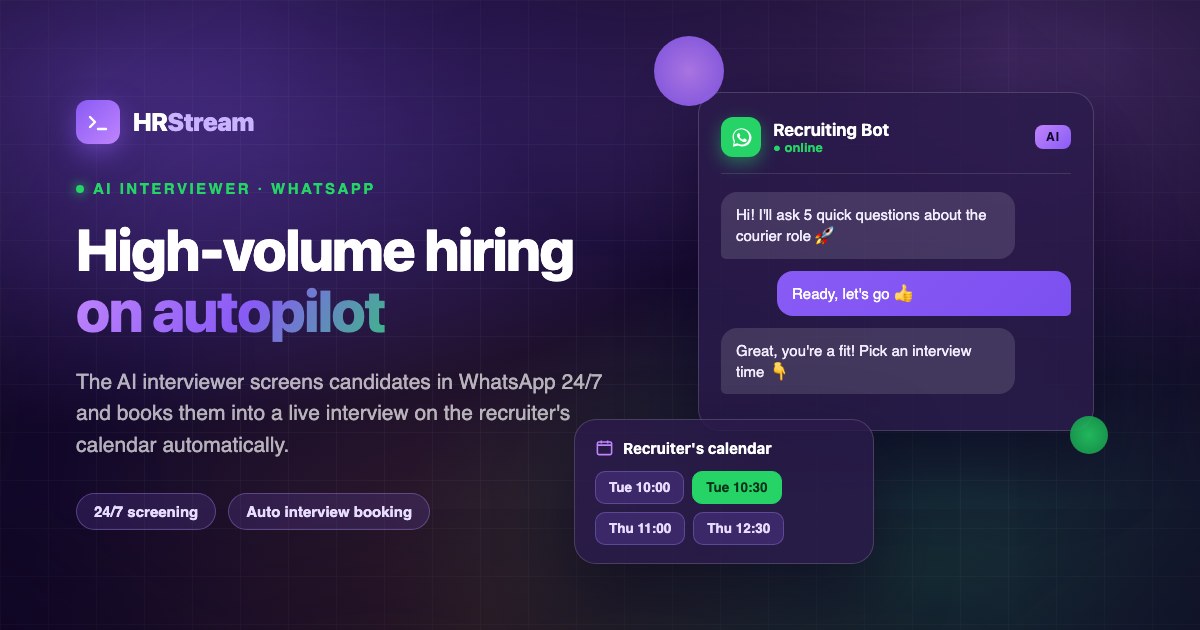
HRStream's messenger isn't just a tool for recruiters. It's also the platform through which the AI interviewer operates.
How AI Uses the Messenger
- A candidate applies for a job (via HeadHunter, the company website, or directly).
- The AI interviewer sends a greeting on WhatsApp — introduces itself and explains the brief screening format.
- The candidate answers questions — right in WhatsApp, in the familiar chat format.
- The entire conversation is saved in HRStream's messenger. The recruiter can see the AI's dialogue with the candidate, scores for each question, and the AI's final recommendation.
- The recruiter continues the conversation — after AI screening, the recruiter can message the candidate in the same chat thread. For the candidate, it's a seamless experience: they answered questions, then spoke with a real recruiter — all in the same WhatsApp chat.
Seamless Handoff from AI to Recruiter
This is the key advantage. The candidate never notices the transition — they're communicating in the same WhatsApp thread throughout. First the AI asks structured questions; then the recruiter takes over with a live conversation. The entire history — AI screening and recruiter messages alike — lives in one thread, linked to the candidate's profile.
Mobile Version of the Messenger
HRStream's messenger is fully responsive for mobile devices. Recruiters can respond to candidates from their phones — on the go, between meetings, or from a café.
Mobile Interface
- Conversation list — full-screen, with the same filters and counters as the desktop version.
- Chat — opens full-screen when a conversation is selected. A back button returns to the list.
- Candidate context — accessible via swipe or a button. A compact view of key information: name, position, pipeline stage.
The mobile version requires no app installation — it runs in the browser. Open app.hrstream.kz on your phone and navigate to the messenger.
Communication Analytics
HRStream's messenger collects data that helps you improve candidate communications:
- Response time — average time from receiving a candidate's message to a recruiter's reply. Industry standard: under 2 hours during business hours.
- Response rate — what percentage of incoming messages received a reply. The goal is 100%; the reality without an ATS is 70–80%.
- Hourly activity — when candidates are most likely to message. Helps with workforce planning for recruiters.
- Template effectiveness — which message templates generate the most replies from candidates.
Real-World Case Study: A 5-Person Recruiting Agency
Here's how HRStream's messenger transforms day-to-day operations at a small recruiting agency.
Before HRStream
- Each recruiter communicated with candidates through a personal WhatsApp account.
- When a recruiter left, all conversation history was lost — three months of work, gone.
- Management had no visibility into how recruiters were communicating with candidates.
- Two recruiters repeatedly messaged the same candidate on behalf of the company.
- Average response time to candidates: 4–6 hours (while the recruiter checked all channels).
After HRStream
- All conversations in one place, on a shared company WhatsApp number.
- When a recruiter leaves, the full history stays in the system. The new hire picks up right where their predecessor left off.
- Management can see all communications, response times, and communication quality.
- The system alerts recruiters when a candidate is already in an active conversation with a colleague.
- Average response time: 15 minutes (thanks to notifications and a unified inbox).
Results after 3 months:
- Time spent on communications reduced by 35%.
- Candidate NPS rose from 6.2 to 8.4 (driven by faster response times).
- Zero lost conversation histories during recruiter transitions.
Security and Privacy
- WhatsApp Business API — official integration via Meta (Facebook). No grey-market workarounds or unofficial clients.
- Encryption — all messages travel over a secure channel (HTTPS/TLS). WhatsApp provides end-to-end encryption on its side.
- Access control — roles and permissions in HRStream determine who can see which conversations. Admins see everything; recruiters see their own job pipelines.
- Legal compliance — data is stored in accordance with the Republic of Kazakhstan Law on Personal Data and Its Protection. Candidates can request deletion of their conversation history.
- Action audit log — all messenger activity is logged: who wrote, when, and what was changed.
How to Set Up the Messenger
Setup takes 15–30 minutes:
- Sign up at HRStream (14-day free trial).
- Connect WhatsApp Business API — under Settings → WhatsApp. You'll need a verified Meta business account and a phone number for WhatsApp Business.
- Set up message templates — create templates for common situations (invitation, rejection, information request).
- Invite your team — add recruiters to your HRStream organization. Each will get access to the messenger.
- You're done — inbound messages will start flowing into the messenger, and AI screening can use WhatsApp as a communication channel.
Frequently Asked Questions
Can I use an existing WhatsApp number?
Yes, but the number needs to be connected to the WhatsApp Business API. If you're currently using standard WhatsApp or the WhatsApp Business app, you'll need to migrate to the API. HRStream can assist with this process.
Will candidates know they're talking to a system rather than a phone?
No. From the candidate's perspective, it's a normal WhatsApp chat. They see your company's name and profile photo (just like any WhatsApp Business account). Messages from the AI and the recruiter come from the same number — candidates can't tell the difference.
What if a candidate messages outside of business hours?
The message is saved in the messenger and waits for a recruiter's reply. If an AI interviewer is configured, it can automatically respond and conduct a screening — even at night or on weekends.
Can multiple WhatsApp numbers be connected?
Yes. For example, separate numbers for different offices or recruiting functions. All conversations from all numbers appear in the unified messenger interface.
Are there limits on message volume?
WhatsApp Business API has its own limits based on the verification tier of your business account. For most companies, the standard limit (1,000 unique contacts per day) is more than sufficient. The limit can be increased as you scale.
Are other messengers besides WhatsApp supported?
At the moment, WhatsApp is the primary channel — it's the most widely used messaging app for professional communication in Kazakhstan and the CIS. Telegram and other channel integrations are on the product roadmap.
Conclusion
HRStream's omnichannel messenger is more than just a "chat." It's a tool that turns chaotic recruiting communications into a transparent, manageable process. Every message carries context — candidate, job, pipeline stage. Every conversation is accessible to the whole team. AI screening operates in the same channel as live human interaction.
Key advantages:
- Single window for all communications — WhatsApp and web chat in one place.
- Automatic linking to candidate profiles and job openings — full context in one click.
- Team-wide transparency — full communication history preserved, nothing gets lost.
- AI screening in the same chat — seamless handoff from bot to recruiter.
- Priority system — important messages don't get buried in the feed.
- Mobile-friendly — respond to candidates from anywhere.
Try HRStream free for 14 days and see how a unified messenger transforms the quality of your recruiting communications.